

Using airport Wi-Fi to check a bank balance has a way of making anyone pause. That same link is sitting on a network full of strangers, and a stolen password can ruin a trip in seconds. A VPN for travelers solves that problem, wrapping every connection on your phone in a layer no one else can see through. The worry lifts, and the trip opens up without constant worrying.
Norton VPN blocks any kind of threat to your personal data and allows your phone or computer to reach websites that would otherwise be locked due to your current region. In this guide, Tripiefly explains what the app can bring to the table and how to set it up before your flight leaves the runway. Keep reading to make sure that every connection from here on stays locked away from prying eyes.
You might like: Travel for free: this app gives you free stays worldwide

VPN for travelers: what it protects and when you need it
VPN stands for Virtual Private Network, and it works by sending a phone or laptop’s internet traffic through an encrypted tunnel, so nobody else on a network can read what passes through.
A VPN for travelers does that job at airports, hotels, train stations, or anywhere else a device is able to join a network shared with strangers with no reason to trust.
That same tunnel also hides a device’s actual location, which lets your devices open banking apps, streaming platforms, and websites that block visitors from outside certain regions.
Public Wi-Fi risks at airports and hotels
Most airport lounges and hotel networks ask for little beyond a room number or a name, which means dozens of strangers end up sharing the same connection.
Devices on a shared network can sometimes see each other, and with the right tools, someone nearby could intercept a login, a card number, or an unencrypted message.
Personal data exposed on open networks
An open network skips the password screen entirely, letting any device within range connect without proving who owns it or where it came from in the first place.
Saved passwords, banking details, and private photos can travel across that same open signal, and a VPN for travelers seals every byte off from outside eyes right away.
Streaming and banking access while abroad
Licensing agreements tie shows and movies to specific countries, so a streaming app that runs fine at home can refuse to load once a phone crosses a border.
Banks face the same regional walls, frequently treating a login from an unfamiliar country as a fraud attempt and freezing the account until someone calls to confirm it.
3 benefits of using a VPN when traveling
Privacy on public Wi-Fi gets most of the attention, but a VPN does a few other things that make a noticeable difference once a trip is already underway.
Blocking malware, keeping browsing history away from internet providers, and cutting off ad trackers are three things a VPN for travelers handles in the background every single day.
None of these benefits requires setup beyond turning the app on, and each one covers a different way a trip abroad leaves a device exposed to outside interference.
Protection from malware on every connection
Public networks are a common delivery route for malware, since a compromised hotspot can push harmful files onto any device that connects without a solid layer of protection.
A VPN intercepts that traffic before it reaches the device, which means a fake hotspot at a busy terminal does far less damage to someone who’s already covered.
Your browsing history stays yours alone
Internet providers can log every site a device visits, and abroad, that logging falls under a different country’s rules, which may offer weaker privacy protections for foreign users.
Routing traffic through an encrypted tunnel means the local internet provider only sees a connection, not its contents, and that’s what a VPN for travelers delivers by default.
Fewer targeted ads following you around
Advertisers drop tracking scripts across websites that follow a device from page to page, building a profile of browsing habits that crosses borders as easily as luggage does.
Masking a device’s IP address and location disrupts the data those trackers rely on, so the ads that follow a traveler around lose most of their targeting accuracy.
You might like: Stop paying roaming charges: download this free Wi-Fi map app
Step-by-step guide to setting up a VPN before your trip
Norton VPN is available on both Android and iOS, and setting up the app takes no time at all, which leaves plenty of time to test everything before a flight ever gets close.
You can install and tweak the app’s settings before leaving home for a trip and see how this VPN for travelers pays off, since scrambling to set it up at the airport rarely ends well.
A 7-day free trial covers everything available in the app at no cost, so there’s room to explore every feature and land on the right plan before committing to a subscription.
Step 1: download the app and sign up
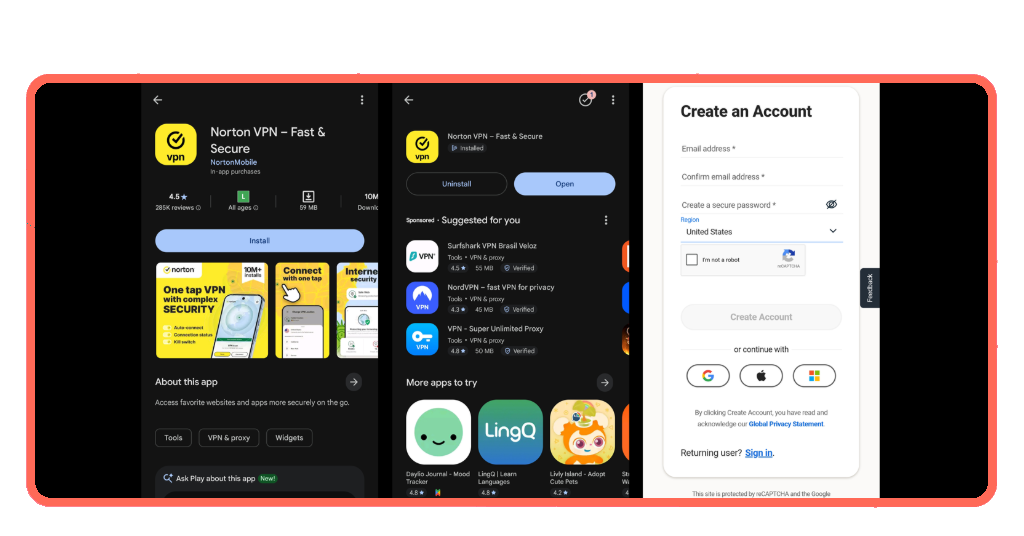
Norton VPN is a free download on the App Store and Google Play, and creating an account takes under two minutes with an email address and a secure password.
Signing in with a Google, Apple, or Microsoft account is also an option, which skips the manual setup and drops a user straight into the app’s main screen.
Step 2: pick a plan that fits your needs
The Standard plan starts at $ 29.99 a year, while Plus adds malware protection and a password manager, and Ultimate brings parental controls and 50 GB of cloud backup.
For most people heading abroad, Plus covers the essentials, but the 7-day free trial on this VPN for travelers plan lets you test all three tiers first.
Step 3: choose a server location
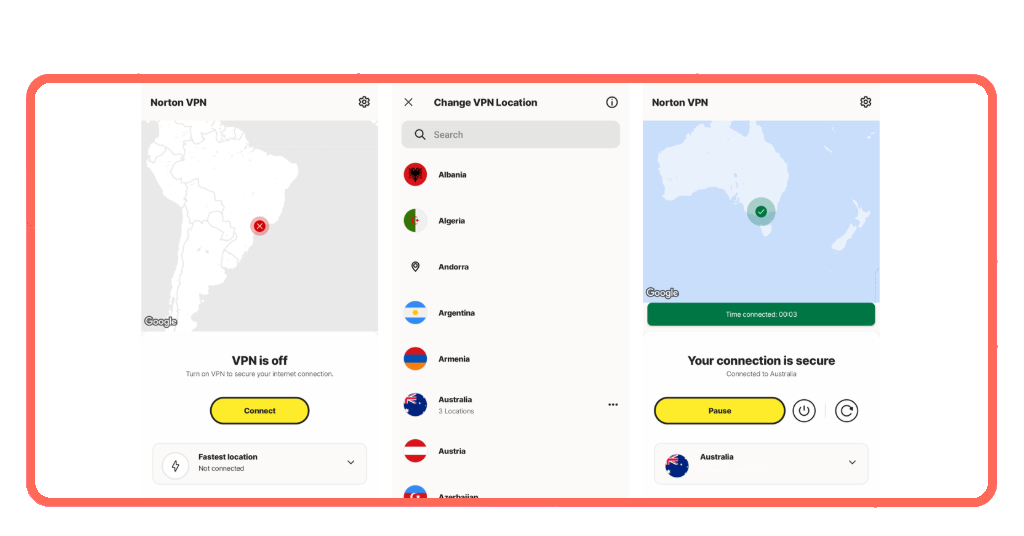
After signing in, the app opens to a map with a ‘Connect’ button that links to the nearest server, which is the right starting point for most trips.
Tapping ‘Change Location’ pulls up a full list of countries and cities, and anyone wanting to keep a home country connection can select that region and connect immediately.
Step 4: turn on extra features before departure
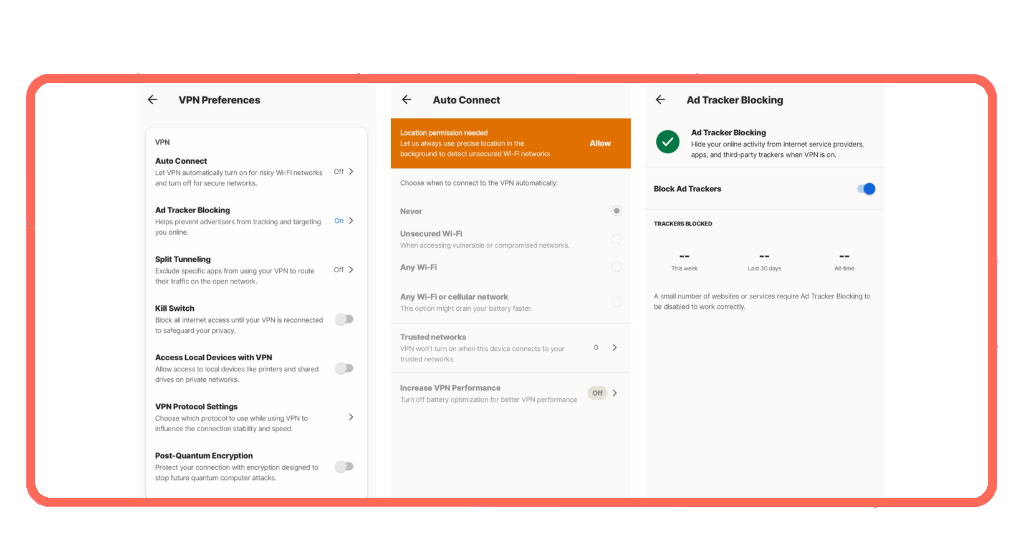
Before the first connection on the road, toggling ‘Auto Connect’ in settings means this VPN for travelers activates the moment a device joins any public or unfamiliar network.
‘Kill Switch’ and ‘Ad Tracker Blocking’ are also good to enable, since the first cuts internet access if the VPN drops, and the second prevents advertisers from targeting you.
VPN, eSIM, and offline maps: how the three tools work together
Traveling abroad with a phone and a roaming plan leaves three problems open: an exposed connection, a rising data bill, and no way to navigate without a signal.
A VPN for travelers, an eSIM, and offline maps each handle one of those problems, and together they address most of what goes wrong on a trip abroad.
The combination works across the whole itinerary, from the airport lounge on day one to a rental apartment with unreliable Wi-Fi on the last night before flying home.
VPN for private and protected browsing
Norton VPN (Android | iOS) stays active in the background while you browse, shop, or check emails, keeping every request encrypted so the network never sees what you’re doing.
Features like IP Rotation and Double VPN add extra layers for trips where privacy is a priority, cycling through addresses or routing traffic through two separate servers simultaneously.
eSIM for reliable data without roaming fees
An eSIM is a digital SIM card built into a phone that lets a traveler switch to a local carrier abroad without swapping out a physical card entirely.
Local data plans through an eSIM cost a fraction of what international roaming charges run, and the switch takes a few taps inside the phone’s settings before departure.
Offline maps for navigation without a signal
Downloading maps before a flight means a phone running a VPN for travelers can navigate city streets, hiking trails, and transit routes without a single bar of signal.
Offline maps store everything locally on the device, so a dead zone, a spotty connection, or a drained data plan never leaves a traveler guessing where to turn.
You might like: Travel eSIM: how to get internet abroad without roaming fees
Protect your trip before it even starts
NortonVPN takes about five minutes to set up, and once it’s running, every public network on a trip stops being a reason to hesitate before opening an app.
In this guide, Tripiefly walked through how a VPN for travelers protects personal data, blocks malware on public networks, hides browsing history, and keeps a device fully secure abroad.
Browse more Tripiefly articles for other resourceful apps that make traveling less stressful, from planning the first leg of a trip to landing safely at the final destination.