


The modern traveler knows that the most heartbreaking sight in a foreign city isn’t a closed museum but a ‘fully booked’ sign hanging on the door of a local bistro. To avoid eating a lukewarm sandwich from a train station kiosk, one must master the art of the restaurant reservation app, the ultimate digital buddy who helps you bypass the hungry throngs and walk to your table with the quiet confidence of a local regular.
Drop the game of musical chairs where the loser goes to bed hungry: a restaurant reservation app ensures that your evening plans are anchored by a confirmed booking rather than a hopeful prayer. And while the market is flooded with various dining platforms, one remains the undisputed heavyweight champion. Check it out.

OpenTable: restaurant reservations app for travelers
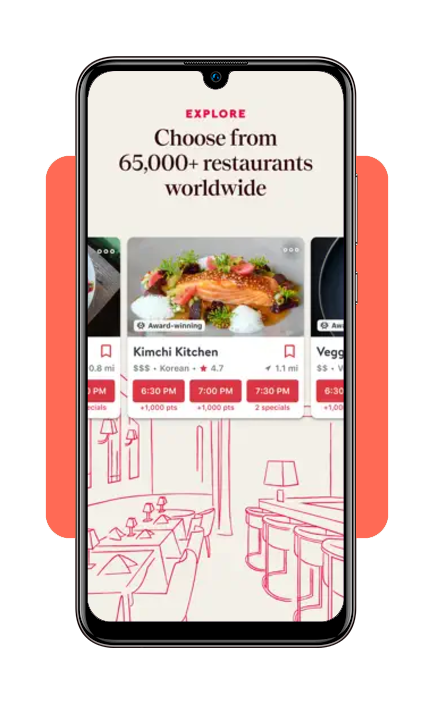
With over 50,000 restaurants globally and 31 million diners seated every month, OpenTablen offers a level of scale that competitors simply cannot match.
For the traveler, this means whether you are in the heart of Manhattan or a quiet corner of London, you are likely only a few taps away from a confirmed seat.
Available for iOS and Android, the restaurant reservation app doesn’t just tell you that a place is good, but it also shows you exactly when you can eat there.
There is a certain practical joy in seeing a real-time grid of available times, so you get to plan your day around a 7:30 PM sunset view or a late-night post-theater supper.
It effectively removes the language barrier and the awkwardness of long-distance phone calls to busy hosts who may not speak your primary language.
Oh, not sure if you wanna give a try to another paid app just to end up disappointed?
Using OpenTable is 100% free.There are no subscription fees, download costs, or per-reservation charges for the person booking the table.
You simply download the app, find a restaurant, and secure your spot at no extra cost
How to search for restaurants with OpenTable
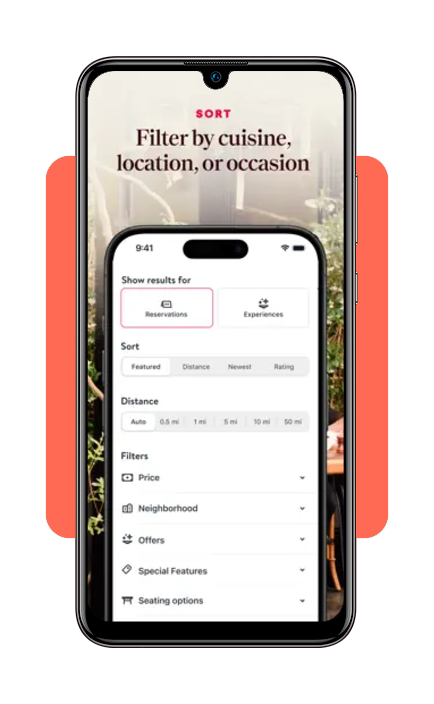
Searching within this restaurant reservation app is designed for the indecisive and the adventurous alike.
You can filter by ‘Nearby’ to solve an immediate hunger crisis or search by specific neighborhoods, cuisines, and price points for future planning.
The app’s interface provides dinner photos of the actual food—often a more reliable metric for quality than a professional PR shot—and verified reviews from people who have actually sat in those chairs.
For those traveling in groups, the app provides a crucial filter: ‘Good for Groups’. We’ve all experienced the logistical nightmare of trying to find a table for eight on a Saturday night.
By using the restaurant reservation app to filter for capacity, you save yourself the physical exhaustion of walking from door to door only to be told the wait is two hours.
You can even browse menus ahead of time to ensure there are options for the picky eaters or the vegans in your party.
How to book your reservations
Once you’ve found the perfect spot, the booking process within the restaurant reservation app is remarkably frictionless. You select your party size, the date, and your preferred time.
A feature to keep an eye on: OpenTable has the ability to add ‘Special Requests’.
Whether it’s an anniversary, a specific dietary allergy, or a request for a quiet corner table, these notes go directly to the restaurant’s front-of-house system, ensuring they are prepared for your arrival before you even step off the plane.
- Select availability: choose from the real-time slots displayed in the app;
- Confirm details: input your contact information (usually saved in your profile for one-tap booking);
- Add to calendar: the app offers a seamless ‘Add to Calendar’ button, which is a godsend for anyone trying to keep their digital life organized;
- Earn points: one of the perks of using this specific restaurant reservation app is the loyalty program. You earn ‘OpenTable Points’ for your bookings, which can eventually be redeemed for dining rewards or hotel discounts, essentially paying you to eat out.
Important cost exceptions for diners
While the app itself is free to use, there are two scenarios where you might see a charge:
- No-show or late cancellation fees: some high-demand restaurants require a credit card to hold your reservation. If you fail to show up or cancel outside of their specific window (usually 24–48 hours), the restaurant—not the app—may charge a fee, which typically ranges from $10 to $50 per person;
- Prepaid experiences: some venues offer special ticketed events, such as a New Year’s Eve tasting menu or a themed brunch. In these cases, you will pay for the meal or a deposit directly through the app at the time of booking.
How do they make money?
If you aren’t paying, the restaurants are. OpenTable charges the businesses for the software and a ‘network fee’ for every person who sits at a table booked through the app (usually around $1.00 to $1.50 per person).
As a traveler, you actually benefit from this model; because the restaurant is paying for your seat, you can often earn OpenTable Points for your reservations, which can eventually be traded in for dining rewards or hotel discounts.
Important tips for travelers
I guess maybe the most critical tip for using a restaurant reservation app effectively is to respect the ‘Cancellation Policy’. In popular tourist hubs, many restaurants now require a credit card hold to prevent ‘no-shows’.
If your plans change—perhaps that museum tour ran late—be sure to cancel through the app as early as possible to avoid a per-person fee.
Most places are quite forgiving if you give them a few hours’ notice, and the app makes this process much less confrontational than a phone call.
Another pro tip: check for ‘1,000 Point’ tables. Some restaurants offer extra loyalty points for booking at off-peak hours, such as 5:30 PM or 9:45 PM.
If you’re a traveler who doesn’t mind an early or late dinner, this is an easy way to rack up rewards quickly.
Also, keep an eye on the ‘Experiences’ tab, where the restaurant reservation app often lists fixed-price tasting menus, brunch specials, or holiday events that aren’t advertised elsewhere.
The verdict: a travel necessity
Is a restaurant reservation app strictly necessary? Technically, no. You could spend your vacation wandering the streets, hoping to stumble upon a hidden gem with an open table.
But the best spots are often booked weeks in advance by locals and tourists alike, winging it is a recipe for frustration. Why leave everything to chance?
Feature comparison
| Feature | OpenTable Utility |
| Real-Time Booking | Instant confirmation without waiting for a callback. |
| Verified Reviews | Feedback only from people who actually honored their booking. |
| Dietary Filters | Easily find gluten-free, vegetarian, or nut-free options. |
| Global Reach | Works in over 20 countries, making it a true travel companion. |
Ultimately…
When a restaurant reservation app handles the logistics, we tend to spend less time looking at our phones and more time savoring a well-cooked meal—and dinner stops being a chore to be managed.
Well, at least that is the goal.
For more expert advice on navigating the world’s best destinations and finding the tools to make your journey smoother, don’t forget to visit Tripiefly for our latest travel hacks and reviews.