


There’s a specific kind of excitement that hits when you know a trip is coming up and you’ve got the perfect place lined up. A spot with everything you need to actually unwind and disconnect. The hard part is finding it, and searching for vacation rentals across dozens of confusing websites and listings can really take the edge off before you’ve even packed a bag.
With thousands of properties across 190 countries, the Vrbo app lets you browse, compare, and book from your phone in an effortless process. Tripiefly put this guide together so you can get the most out of every feature the app has to offer and plan your next getaway. Keep reading, and you’ll be ready to book a stay that turns a regular trip into something you’ll talk about for years.

Vrbo: best vacation rentals app
Vrbo (Android | iOS) is the kind of app that makes you want to plan a trip just by opening it. It offers homes, beachfront bungalows, and much more across 190 countries, all in one place.
The app covers everything from the first search to checkout day, with filters, reviews, and booking tools that make the whole process feel a lot less like homework and a lot more like fun.
And if you’ve ever spent an afternoon buried in browser tabs trying to pin down the right vacation rentals, this is the app that puts an end to that particular headache.
Features available on the Vrbo app
- Flexible date search: compare prices and availability across multiple dates at once, so you can find the best window for your trip without manually checking each one;
- Trip planner: save your favorite properties, leave comments, and keep all your trip details organized in one spot so nothing slips through the cracks;
- 24/7 live support: reach a real person by phone or chat any time before, during, or after your trip, with an average wait time of about a minute;
- Offline access: pull up check-in instructions, WiFi passwords, and arrival details directly from the app, even without an internet connection at your destination.
One Key rewards on every booking
One Key is Vrbo’s rewards program, and it’s one of the few perks in travel that actually works across more than just one type of booking on a single platform.
Every eligible stay earns you rewards you can put toward vacation rentals, flights, hotels, and car rentals, making it worth using consistently rather than just for one-off trips.
The more you book, the more you accumulate, and there’s no complicated system to figure out. It works in the background every time you confirm a stay.
Find unique stays not listed elsewhere
Vrbo focuses exclusively on private properties, which means the inventory looks a lot different from what you’d find on platforms that mix hotels and shared spaces into the same search.
You’ll come across homes with private pools, large backyards, and setups that work well for a longer stay, including select vacation rentals with discounts of up to 10% on extended bookings.
That kind of variety is hard to find anywhere else, and it’s a big part of what keeps travelers coming back to the app every time they plan a trip.

Step-by-step: how to find rental options in Vrbo
The Vrbo app (Android | iOS) walks you through everything in a way that feels natural, and you don’t need to be particularly tech-savvy to figure out where anything is.
Searching for vacation rentals here is a different experience from jumping between websites, mostly because everything you need to compare and decide is already in one spot.
From the first tap to the booking confirmation, the app keeps things organized so you always know where you are in the process and what comes next.
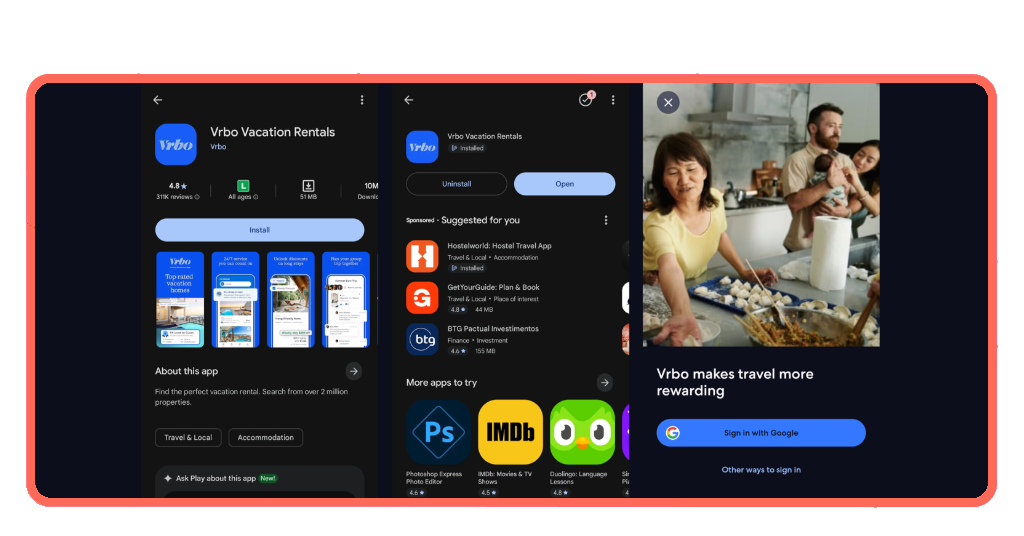
Step 1: download the app on your phone
Open the App Store or Google Play, look up ‘Vrbo’, and tap on ‘Get’ or ‘Install’ to download. It’s free, installs in seconds, and you’ll be inside the app before you know it.
From there, create your free account using your Google credentials or a simple email and password combo. Either way, the whole setup takes less than two minutes to complete.
Once you’re in, add your payment details so everything is ready to go when you find a property worth booking. No scrambling for your card when the moment arrives.
Step 2: search and filter your ideal rental
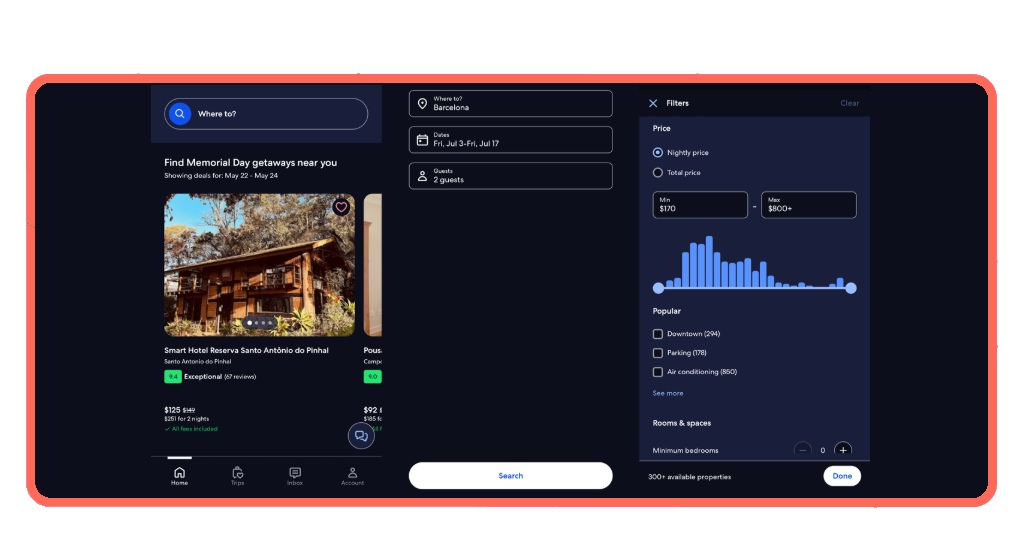
Browsing vacation rentals on Vrbo starts with a destination and your travel dates. The app immediately pulls up everything available so you can see what you’re working with.
The filters let you dial things in by price range, property type, and amenities, which cuts down the list and keeps you focused on places that fit your needs.
‘Flexible dates’ search is a great tool you can use if your travel window has some room for adjustment. It lays out price differences across dates so you can pick the most affordable option.
Step 3: book and access your trip details
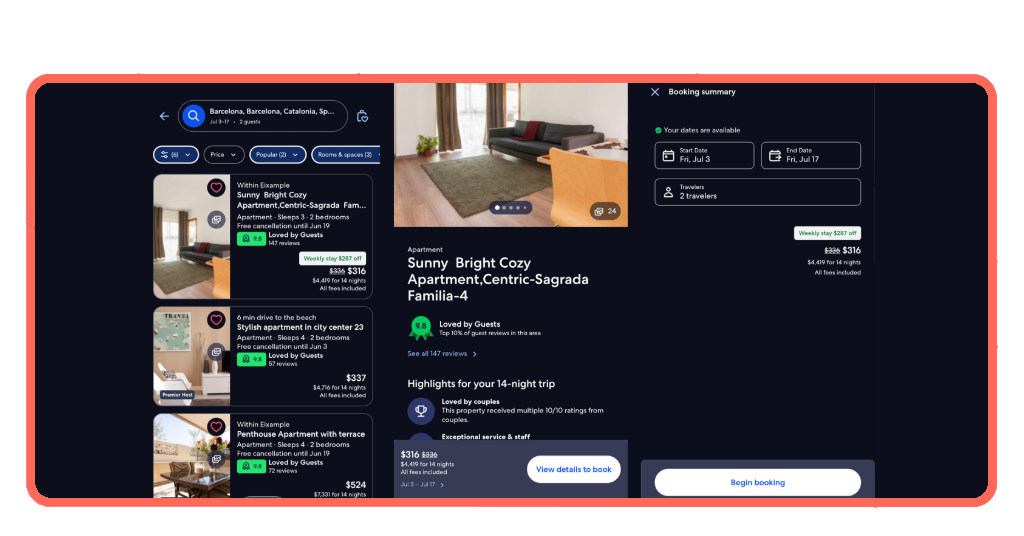
Before you confirm anything, you can message the host directly through the app to ask about the property, which gives you a clearer picture of what to expect on arrival.
When you’re ready, booking happens entirely within the app using your credit card, and your confirmation, along with all your trip details, lands in your account right away.
Everything you need for arrival is stored in the app and available offline, so even without a signal at your destination, your vacation rentals check-in info is always within reach.
What to look for in a rental option
Not every property that looks good in photos delivers on arrival, and knowing what to pay attention to before booking saves you from a trip that doesn’t live up to expectations.
The right vacation rentals come down to more than just price and location. Amenities, reviews, and booking flexibility all play a role in whether a stay works for you.
Vrbo gives you the filters and information you need to make a call you feel good about, so take the time to use them before you tap that confirm button.
Prioritize amenities that match your travel style
A pool sounds great until you realize you booked a place without a washer for a two-week stay. Think about what you’ll really use daily before filtering your search.
The app lets you filter by specific amenities, so you can select properties that have exactly what you need rather than scrolling through dozens of places that don’t fit.
Some travelers need a fully equipped kitchen, others want outdoor space or a dedicated workspace. Sorting your priorities before going in makes the search a lot more efficient.
Read reviews before pulling the trigger
Photos show you what a place looks like on a good day, but vacation rentals live and die by their reviews, and Vrbo makes it easy to read through them before deciding.
Look for patterns in the feedback rather than fixating on a single bad review. If multiple guests mention the same issue, that’s worth factoring into your decision before booking.
Vrbo displays reviews right on the property page alongside photos, so you don’t have to dig for them. A few minutes reading through them can save you a lot of regret.
Compare prices across flexible dates
Shifting your travel dates by even a few days can make a noticeable difference in what you pay, and Vrbo’s flexible dates search makes it easy to spot those windows.
Some properties also offer discounts on longer stays, and if you’re browsing vacation rentals with a flexible schedule, that saving can become significant.
Comparing options side-by-side before committing gives you a fuller picture of what’s available and helps you feel confident that the price you’re paying is truly worth it.

Tips for safe and secure vacation bookings
Booking a trip online involves handing over personal and payment information, and it’s important to make sure that the platform and process you’re using really protect that data.
Vrbo has tools built into the app that keep your booking experience secure from start to finish, and using them the right way makes a real difference in your peace of mind.
A few habits go a long way when browsing vacation rentals, and paying attention to the details before you confirm a booking is what separates a great trip from a stressful one.
Book and pay directly within the app
Any time a host asks you to pay outside the app, through a bank transfer or a third-party link, that’s a red flag you shouldn’t ignore before handing anything over.
Vrbo’s in-app payment system keeps your credit card details encrypted and your transaction tied to your booking record, giving you a paper trail if anything goes sideways.
Paying through the app also means Vrbo’s support team can step in if a dispute comes up, and that kind of backup is impossible to get when you pay off-platform.
Message the host before committing
Reaching out to a host before booking tells you a lot about what kind of experience you’re walking into. A slow or vague reply is a signal to pay attention to.
The best hosts respond quickly and give you clear answers, and booking vacation rentals is a lot more reassuring when you know the person behind the listing is genuinely responsive.
Vrbo keeps all your messages in one place inside the app, so your conversation history is always there if you need to refer back to something the host told you.
Save trip details for offline access
Arriving at a new place is a lot smoother when you already have everything you need on your phone. Check-in instructions, Wi-Fi passwords, and arrival details are all stored in the app.
Vrbo makes it easy to keep track of all your upcoming vacation rentals in one spot, so switching between trips or checking details for a future stay takes just a couple of taps.
You can also share trip details with anyone joining you, so everyone arrives informed, and nobody is stuck waiting on a forwarded confirmation email.
Pack your bags and let Vrbo do the rest
The Vrbo app takes the hassle out of finding a place to stay and puts everything you need to plan, book, and travel right in your hands.
In this guide by Tripiefly, you discovered how vacation rentals on Vrbo come with rewards, flexible search tools, and secure booking features that make every trip easier to pull off.
Explore other Tripiefly articles for more guides on the best apps to book your next stay and find the one that fits the trip you’ve been dreaming about.