


Ticket prices are one thing, but finding flights to World Cup games that don’t drain your account before you even land is a different challenge. Fares to host cities across the US, Mexico, and Canada have been climbing steadily, and every week you wait tends to cost you more. The window to book at a price that fits your budget is still open, but it won’t stay that way for much longer.
KAYAK searches hundreds of travel sites at once, so you’re seeing real options across airlines and agencies, with price alerts, budget filters, and bundle options that give you the tools to act before fares jump again. We at Tripiefly will teach you how to use them, what to check before booking, and how to land a deal that still leaves room for the trip. Keep reading our guide, and let’s make sure you get to that stadium.
You might like: Upgrade to business class: fly better without paying the full price

How to find cheaper airfare to the World Cup?
Fares to host cities don’t drop on their own just because you want them to, and waiting around hoping for a better price rarely works out the way you’d expect.
Searching for flights to World Cup destinations across multiple sites at once is where KAYAK (Android | iOS) gives you a real edge over booking directly through any single airline.
The tournament runs through July 19th, which means there’s still a stretch of matches left, and using the right tools can help you find something that won’t leave your wallet empty.

Set price alerts before seats fill up
KAYAK (Android | iOS) lets you track any route you’re watching and sends you a notification the moment the fare on that specific search changes in any direction.
You don’t have to keep refreshing the same search every morning, hoping something shifted overnight, because the alert does all of that waiting on your behalf automatically.
Setting this feature up is almost automatic on the app, and it means you’re moving the second a price drops instead of finding out about it two days too late.
Filter by budget on KAYAK’s ‘Explore’ tab
Searching for flights to World Cup host cities on KAYAK’s ‘Explore’ lets you enter a number and instantly see every destination reachable within that range from your airport.
It’s especially useful if you’re open to attending a match in any host city, since the cheapest option might not be the one you originally had in mind.
You can shift the budget slider around and watch the results change in real time, which makes it a lot easier to spot where the real value is sitting.
How nearby airports can help reduce airfare prices
Flights to World Cup venues in cities like Dallas, New York, or Los Angeles aren’t always cheapest when you’re flying into the main international airport serving that area.
Smaller regional airports nearby tend to have less demand during major events, which can translate into fares that are noticeably lower for the same travel dates.
KAYAK lets you expand your search to include nearby airports with a single toggle, so comparing both options at once doesn’t require running a separate search from scratch.
Step-by-step to finding flights to World Cup matches
Getting KAYAK (Android | iOS) set up before you start searching makes the whole process move along without any of the troubles that come with booking on a desktop browser.
Once you’re in, searching for flights to World Cup host cities takes a few taps, and the results are pulled from hundreds of travel sites, so nothing gets left out of your search.
The tournament is already underway, and group stage matches are still happening, so there’s a real urgency in getting this done sooner rather than sitting on it any longer.
Step 1: download the app and sign up
Open the App Store or Google Play, search for ‘KAYAK’, and download the app onto your phone before anything else so you’re ready to start searching right away.
You can create an account using your Google credentials or email, and it’s what lets you save searches, set price alerts, and access your trip details even when you’re not connected to Wi-Fi.
Once you’re signed in, the home screen gives you direct access to flight searches, hotel lookups, and your saved trips, all from the same place without any extra navigation.
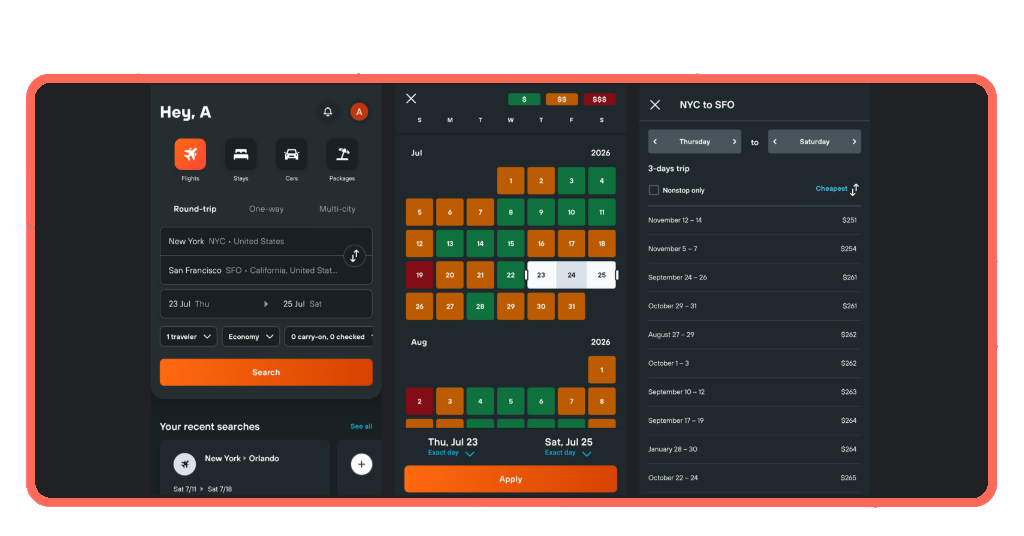
Step 2: open KAYAK and enter your route
Tap the ‘Flights’ tab, enter your departure city, and then pick whichever host city you’re targeting, whether that’s Dallas, Miami, Los Angeles, or any other venue hosting matches.
KAYAK’s search pulls in fares you’d likely never find by checking one site at a time, and having all of that in front of you makes it easier to spot where the best deal is hiding.
You can also toggle flexible dates on if your schedule allows some movement, since shifting a day or two in either direction can sometimes show a lower fare for the same route.
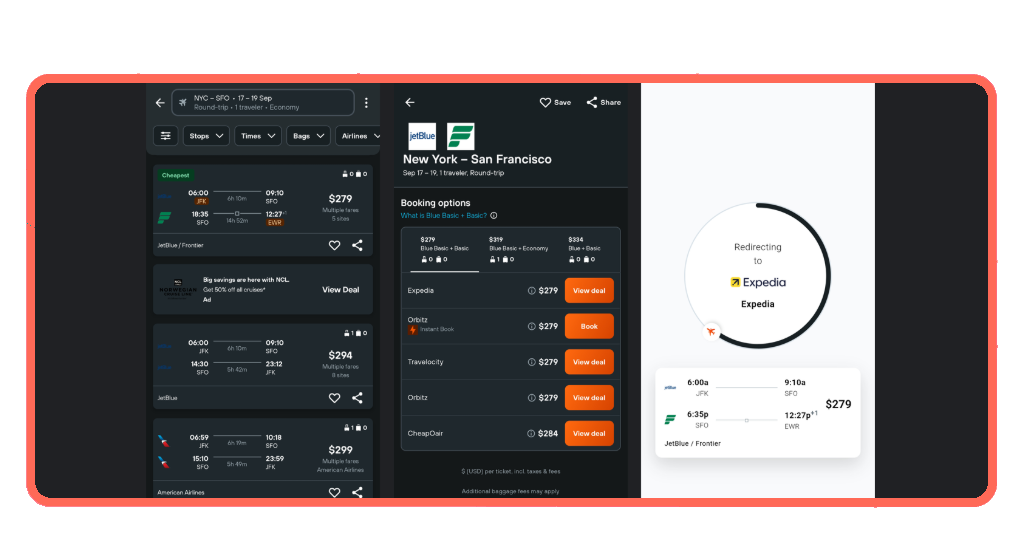
Step 3: compare options and book your flight
The results page lines up your options by price, duration, and number of stops, so you can quickly scan what’s available before applying any filters to narrow things down further.
Once you spot a fare that works for your dates, the app shows you which site is offering it and routes you directly there to complete the booking without losing the price you found.
Checking the baggage policy before you confirm is worth doing at this stage, since some of the lower fares include restrictions that could add unexpected costs once you’re at the airport.
You might like: Flight price alerts: how to know before everyone else does
When booking flights and hotels together can save you money
Sorting out your flights to World Cup destinations and your hotel in the same session lets you see the full cost of the trip before committing to either one.
Booking them separately on different days sounds flexible, but it often means paying more overall because prices on both sides shift independently and rarely wait for each other.
With the tournament already live and matches running through mid-July, the overlap between available rooms and reasonable fares is getting thinner every week that passes.
Bundle searches save time and money
Running your flight and hotel searches back to back inside the same app means you’re working with current prices on both without having to switch between different platforms mid-search.
It also gives you a clearer sense of what the whole trip is going to cost before you book anything, which makes it a lot easier to decide what’s actually within reach.
KAYAK pulls accommodation options ranging from major hotel chains to local boutiques, so you’re not locked into one type of property just because you’re searching alongside your flight.
Mobile-only rates add extra value
Some hotels on KAYAK offer rates that are only visible inside the app, which means searching on your phone instead of a desktop browser can surface prices you’d otherwise never see.
Pairing those mobile-only hotel rates with flights to World Cup host cities you’ve already found gives you a better shot at keeping the total trip cost lower than expected.
These deals tend to come from select properties and aren’t always advertised anywhere else, so it’s one of those things you only benefit from if you’re actually searching inside the app.
Track price drops on both at once
KAYAK lets you set price alerts on flights and hotels separately, so you’re covered on both fronts without having to monitor either one manually every time you open your phone.
The app sends you a notification when the fare or nightly rate you’ve been watching drops, and having alerts running on flights to World Cup cities means you’re not missing any movement.
It’s a lot more practical than checking back every day yourself, especially when prices during a major tournament tend to shift more frequently than they would during a regular travel period.
What to check before paying for discounted flights or hotel packages
A low price on a flight or hotel is only a good deal if the booking terms don’t end up costing you more somewhere down the line.
Tournament travel comes with more variables than a regular trip, and a schedule change, a delayed match, or a visa issue can turn a non-refundable booking into a real problem.
Taking a few minutes to review the fine print on your flights to World Cup host cities before you hit confirm can save you a significant amount of stress and money later.
Confirm the cancellation policy first
Not every discounted fare or hotel rate comes with the option to cancel freely, and during such a big event, plans can shift in ways you don’t always see coming ahead of time.
KAYAK lets you filter for free cancellation on both flights and hotels, so finding a refundable option doesn’t require you to dig through the terms on each listing.
If you’re booking multiple nights near a venue, locking in a property that lets you cancel without a penalty gives you room to adjust if the match schedule doesn’t line up as expected.
Check bag size rules before you fly
Discount fares during high-demand travel periods like this one tend to come with stricter baggage rules, and showing up at the gate with the wrong size carry-on adds an avoidable cost.
KAYAK’s bag measurement tool lets you point your phone camera at your luggage and tells you right away whether it meets the size requirements for flights to World Cup travel dates.
Using it before you leave for the airport takes less than a minute and removes any uncertainty about whether your bag is going to make it onto the plane without an extra fee.
Read what the total price includes
The fare you see on the results page isn’t always the fare you pay at checkout, since some listings add seat selection fees, booking charges, or other costs during the final steps.
Once you tap through on a flight or hotel, reviewing the price breakdown before entering any payment details on flights to World Cup trips keeps surprises from showing up at checkout.
KAYAK shows you which site is offering the rate and routes you directly there, so you’re making the final call with full visibility into what the booking actually covers before you confirm anything.
You might like: Hidden airline fees: what makes a cheap ticket expensive
Your World Cup seats are one search away
The tournament matches are already happening, and every day you wait on booking is another day fares and rooms get harder to find at a price that makes sense for your trip.
We hope this guide by Tripiefly helped you feel the excitement of being inside a packed stadium this summer, surrounded by fans from every corner of the world watching history unfold live.
Explore Tripiefly‘s articles for more tips on flights to World Cup host cities, hotels near the venues, and everything else you need to make this work out the way you’re dreaming of.