


The modern traveler is often a stressed-out data architect, juggling emails, PDF attachments, and half-remembered screenshots of hotel addresses. This ritual of digital hoarding is finally being replaced by the efficiency of a dedicated trip itinerary app. It promises a world where flight delays and dinner reservations coexist in a single interface rather than a cluttered inbox.
While many apps claim to revolutionize the way humans move across the globe, most are just glorified digital notebooks with better icons. Tripsy, however, manages to feel like a personal assistant who actually paid attention during the orientation meeting. Ready to get rid of messy logistics? Here’s what even the most disorganized wanderer can do about them.

Tripsy: best trip itinerary app
So in your past trips you found yourself using your smartphone to navigate a remote cobblestone street in Rome while simultaneously losing the reservation for the very trattoria located on that street. Did I get that right?
Maybe you even have been using a trip itinerary app and thought it was not for you. Well, maybe it just wasn’t the right one.
Tripsy earns its keep by not overcomplicating the user experience. It adopts a ‘less is more’ philosophy that focuses on visuals and automated data entry.
The app’s interface is sleek, feels native, responsive, and by simply forwarding confirmation emails to a dedicated address, the app parses the data and populates your schedule
Step-by-step: how to plan your schedule with Tripsy
With Tripsy, one begins by creating a ‘Trip’, which acts as the digital bucket for all future adventures.
Users can invite friends or family members to join the trip, turning the often-combative process of group planning into a collaborative (and hopefully peaceful) endeavor.
Step 1: import
After downloading it to your iOS, forward your flight, hotel, and restaurant confirmations to receipts@tripsy.app. Within minutes, the AI-driven backend extracts the dates, times, and locations.
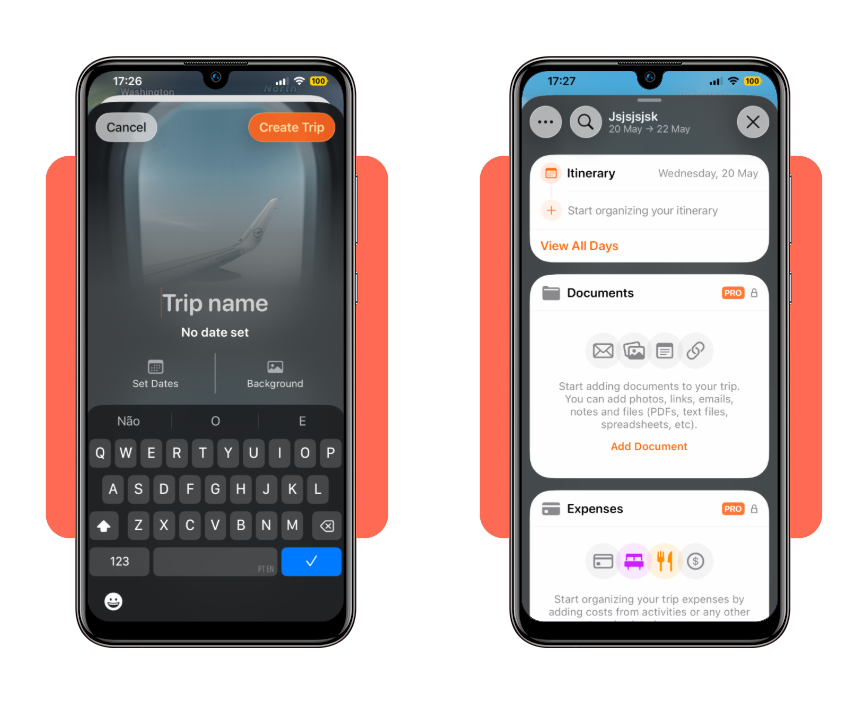
Step 2: customization
Add specific activities that don’t come with a receipt, such as ‘Stare at the Eiffel Tower until I feel cultured’ or ‘Nap in the park’.
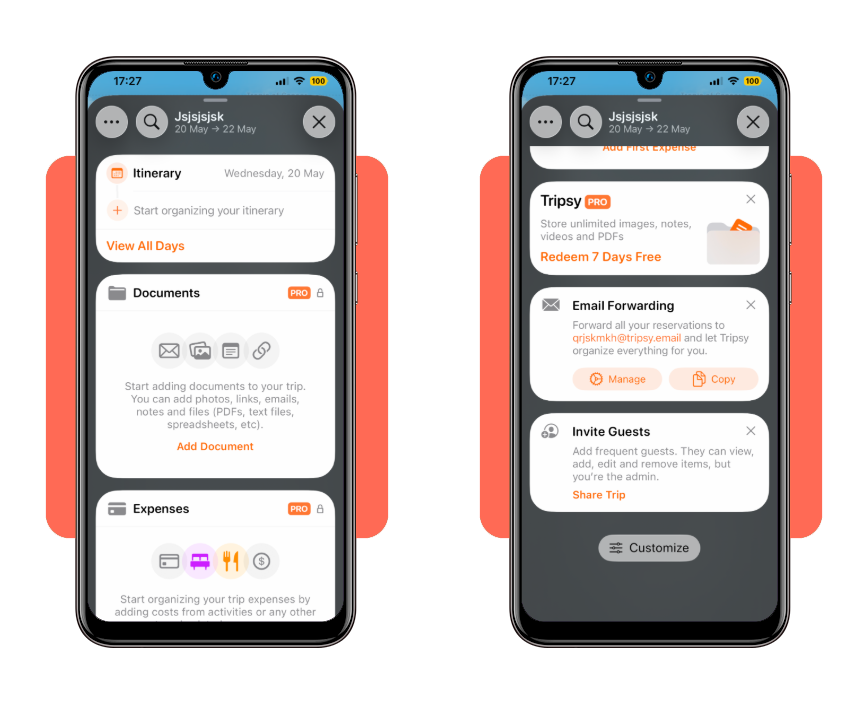
Step 3: enrichment
Each entry can include notes, images, and documents. If there is a specific menu you want to remember or a walking map of the Louvre, it lives right there under the activity.
The app syncs across iPhone, iPad, Mac, and Apple Watch. It even provides ‘Live Activities’ on the lock screen, so you can see your gate number without even unlocking your phone—a true luxury for the weary traveler.
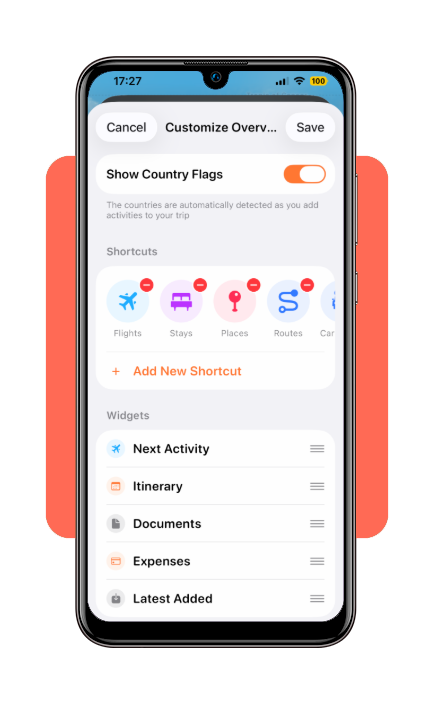
Ideas for a trip schedule
A robust trip itinerary app allows for both the rigid and the spontaneous.
For a 10-day excursion through Japan, one might schedule the Shinkansen (bullet train) transfers with military precision. However, Tripsy allows for ‘time blocks’ where the only instruction is to explore a specific neighborhood.
Consider a ‘Gastronomy Tour’ through Mexico City. Instead of a list of addresses, the app allows for a map-centric view.
You can see your taco stands clustered in Condesa and your fine dining in Polanco, ensuring you aren’t crisscrossing the city like a confused pigeon.
A well-organized trip itinerary app prevents the ‘transit burnout’ that ruins so many well-intentioned vacations.
Tips for safe travel planning and common errors
The most common error in travel planning is ‘Optimism Bias’—the belief that a human can land at Heathrow, clear customs, and make a West End show in 90 minutes.
A trip itinerary app acts as a much-needed reality check.
When you see the physical gap between your arrival at 6:00 PM and your dinner at 7:00 PM, the visual representation of time makes it clear that you will be eating a granola bar in a taxi instead of pasta in Soho.
Security is another factor. Keeping a digital copy of your passport and travel insurance inside a secure trip itinerary app is significantly safer than carrying a physical photocopy that can be left in a hotel lobby.
Furthermore, sharing your itinerary with a ‘home contact’ via the app’s sharing features ensures someone always knows which city you are supposed to be in.
Free vs. Pro features
While the free version allows you to create itineraries and manually add activities, the Pro version unlocks the following:
- Email Forwarding: forward your hotel, flight, and restaurant confirmation emails to have them automatically added to your itinerary;
- Real-time flight alerts: get push notifications for gate changes, delays, and baggage claim info;
- Document storage: upload PDFs, images, and tickets directly to your trips;
- Calendar sync: sync your travel plans with Apple Calendar, Google Calendar, or Outlook;
- Weather forecasts: view a 10-day forecast for your destinations;
- Collaboration: invite others to view and edit your trips;
- Time zone management: automatically handles time zone changes across your schedule.
The current pricing for Tripsy Pro is:
- Monthly: $9.99
- Yearly: $59.99 (the most popular option and often comes with a free trial period).
- Lifetime: $299.00 (one-time purchase that gives you permanent access to all Pro features).
Is it worth it?
Tripsy isn’t the only player in the game. Competitors like TripIt have been around since the dawn of the App Store. However, Tripsy wins on aesthetics and user experience.
While TripIt may feel like a corporate spreadsheet from 2012, Tripsy feels like a modern travel magazine. It’s a trip itinerary app designed for people who actually enjoy the process of travel, not just the logistics of it.
- The pros: incredible Apple ecosystem integration, beautiful UI, and reliable email parsing;
- The cons: it is primarily focused on the Apple ecosystem, leaving Android users out in the cold. The premium subscription, while worth it for frequent flyers, might feel steep for someone who only travels once a year;
- The verdict: if you own an iPhone and value your sanity, this is the best $10-ish dollars you can spend on your vacation.
In the end, any trip itinerary app should disappear—be so intuitive and helpful that you spend less time looking at your screen and more time looking at the world.
And if you give it a try with Tripsy, you might see that it achieves this by doing the heavy lifting behind the scenes so you can focus on the experience.
For more tips on your next journey, make sure to check out the latest guides at Tripiefly, your home for traveling.