


Cell service disappears the moment you need it most. Like when you’re driving through a mountain pass, hiking a trail that cuts through dead zones, or road-tripping across stretches where your phone hasn’t had a single bar in hours. Pulling up a map isn’t an option, and that little spinning icon isn’t helping. An offline GPS app removes that problem entirely, keeping your location locked and your maps loaded with zero connection needed.
Avenza Maps is the app that delivers on that promise and then some, with features built for everyone from casual travelers to field professionals. This Tripiefly guide gives you a full breakdown of the app, a setup walkthrough, and practical tips for long trips off the grid. Dead zones, spotty coverage, and zero bars are about to lose all power over every trip you take from this point forward.

Most reliable offline GPS app
Avenza Maps (Android | iOS) stores full maps directly on your device, so the moment the signal drops, nothing changes on your screen, and your position keeps updating in real time.
The app taps into your phone’s built-in GPS chip to track your location using satellite data, cutting out any dependence on mobile networks, and keeping navigation running at full capacity.
Field crews and weekend hikers swear by this offline GPS app, and it’s easy to see why once you realize how much it handles without ever needing a connection.
Features available in the Avenza Maps
- Real-time GPS tracking: your position updates live on any downloaded map, keeping you oriented on trails, roads, and remote terrain without burning mobile data;
- Placemark and photo tools: drop pins, attach photos, and write notes directly onto any map location, building a personal layer of data as you move through an area;
- Measurement tools: calculate distance, area, and estimated travel time straight from the map, which comes in handy for fieldwork, route planning, and multi-day trip prep;
- what3words integration: pinpoint and share any location on the planet using a three-word address, which is invaluable when GPS coordinates alone aren’t enough.
Built for outdoor explorers
Avenza Maps fits naturally into any trip where the trail takes you further than your signal does, giving you full map visibility and live GPS tracking across any terrain you choose.
You can record your tracks, measure distances, and drop placemarks as you go, so every hike or backcountry route gets documented without you having to stop and fumble with anything.
The compass tools, coordinate display, and real-time position updates make this offline GPS app a capable companion for anyone who spends time outdoors and needs more than a map.
Free to use with flexible upgrade options
This app is free to download and comes with access to a map store full of topographic, nautical, and land use maps from verified publishers.
The Plus plan at $32.99 a month unlocks custom map imports and geofence alerts. The Pro plan at $169.99 turns this offline GPS app into a powerhouse with Shapefile support and more.
Plus and Pro are built for commercial, government, and academic work, but the free tier covers everything a traveler or outdoor enthusiast needs to navigate any dead zone with ease.
Step-by-step: how to access offline maps using the app
Avenza Maps (Android | iOS) has a setup process that takes a few minutes tops, and once it’s done, your phone works as a fully loaded navigation unit anywhere you take it.
The app is available on both iOS and Android, free to download, and doesn’t ask for anything complicated before letting you get into the map store and start exploring.
Pull up a map, save it to your device, and you’ve got an offline GPS app that holds up in places where your carrier has never even heard of.
Step 1: download the Avenza Maps app
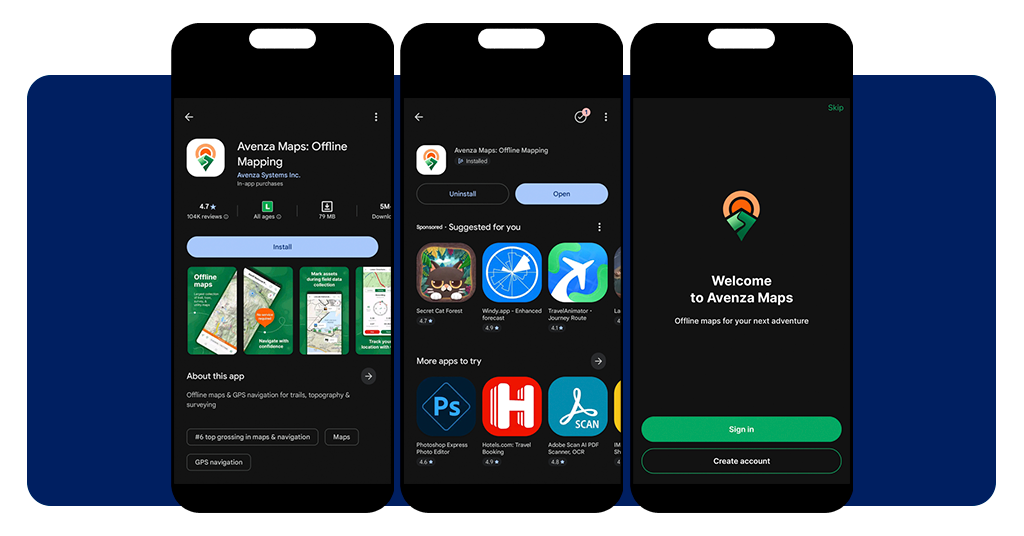
First, head to the App Store or Google Play and search for Avenza Maps, then hit ‘get’ or ‘install’ to download it. The app is free and takes up only a few megabytes on your phone.
Once it’s installed, open it and create a free account or skip that step entirely if you just want to jump straight into browsing maps right away.
The app loads up clean and easy to read, so you won’t need a tutorial to figure out where everything lives or what each section of the interface does.
Step 2: browse and download your maps
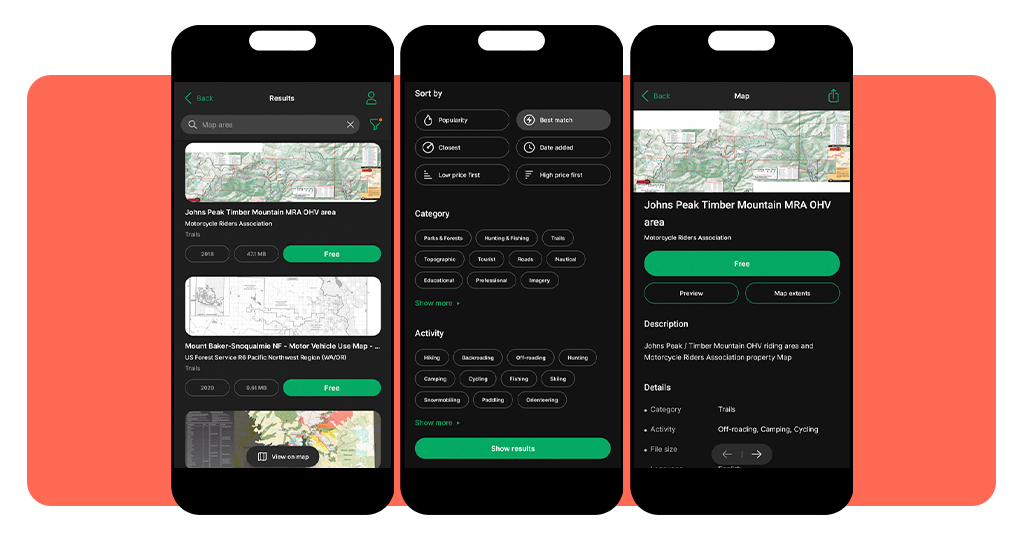
Tap the map store inside the app and browse by region, activity, or map type. You’ll find topographic, nautical, land use, and survey maps all in one place.
Downloading a map saves it directly to your device, and this offline GPS app keeps it stored there so it loads instantly without needing any kind of connection to work.
If you’ve got your own files, you can import PDF, GeoPDF, or GeoTIFF maps straight into the app, and they’ll behave exactly like any other map in your library.
Step 3: navigate your location in real time
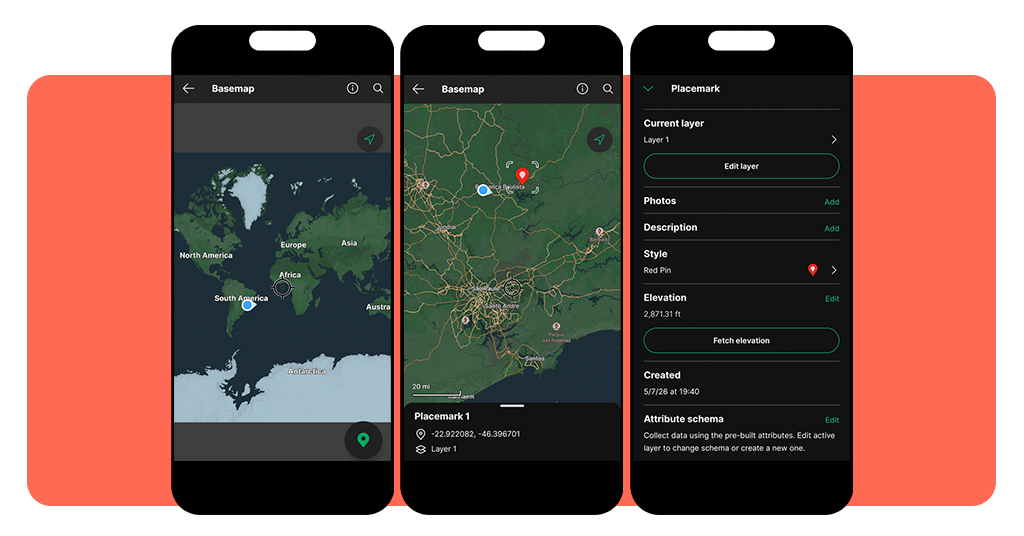
Open any downloaded map, and your position shows up as a live dot that moves with you, pulling location data directly from your phone’s GPS chip and not from any network.
You can drop placemarks, record your track, and measure distances as you go, and this offline GPS app keeps all of that data saved, so nothing gets lost when you close it.
Zoom in, pan around, and check your coordinates at any point during your trip. Everything updates in real time and works just as well in a dead zone as it does in the city.
Tips for saving battery and storage during road trips
Remote road trips have a way of exposing every weak spot in your phone setup, and running low on battery or storage mid-navigation is one of the most avoidable ones out there.
Avenza Maps is built to run lean, but getting the most out of this offline GPS app still comes down to how well you’ve prepared your device before the trip starts.
A few quick adjustments before you leave the driveway keep your navigation sharp, your storage clean, and your battery lasting through the longest stretches of road.
Download only the maps you need
Before any trip, take a look at your actual route and download maps that cover just that area. Grabbing entire regions when you only need a section eats up storage.
Each map file adds up, and a phone loaded with maps you won’t use is a phone running low on space when you need to save something important mid-trip.
Stick to the areas on your itinerary, download at the right zoom level for your activity, and you’ll keep your library lean without sacrificing any coverage that actually matters to you.
Enable airplane mode to preserve battery life
Turning on airplane mode cuts out all the background processes draining your battery, since this offline GPS app only needs your GPS chip to track your position.
Your phone won’t waste power searching for cell towers, syncing apps, or loading notifications, and you’d be surprised how much longer your battery lasts with all of that switched off.
Pair airplane mode with a low screen brightness setting, and your phone will hold a charge through hours of active navigation without needing a top-up from your power bank.
Clear unused maps after each trip
Once a trip wraps up, go into your map library and delete anything you won’t be using again. Holding onto old maps ties up storage space your phone could use elsewhere.
Keeping your library current also makes it easier to find what you need when you’re prepping for the next trip, and this offline GPS app loads noticeably quicker with a clean library.
Make it a habit to do a quick cleanup after every outing, and your phone stays ready for the next adventure without any slowdowns or storage warnings catching you off guard.
Other essential items for places with low coverage
The app handles navigation without a signal, but heading into low coverage territory with just an app on your phone leaves a few gaps you should fill before you hit the road.
A good offline GPS app takes care of your location awareness, but your phone is still one dead battery or cracked screen away from leaving you without any tools at all.
Rounding out your setup with a couple of physical and digital backups means you’re covered even in the scenarios that no app can fully protect you from on its own.
Keep a portable power bank within reach
A power bank is the most practical thing you can pack for any remote trip, keeping your phone alive through long stretches of navigation when outlets are nowhere in sight.
Look for one with at least 10,000mAh capacity so it can fully recharge your phone at least twice, giving you enough buffer for multi-day trips or unexpected detours off your planned route.
Keep it charged before every trip, store it somewhere easy to grab while driving, and you’ll never have to choose between saving battery and keeping your navigation running.
Pack a physical map as a backup
Phones break, batteries die, and apps freeze at the worst possible moments, so having a paper map of your route tucked in the glove box is never a bad call.
This offline GPS app covers the digital side of navigation, but a physical map needs zero battery, zero setup, and works just as well in a rainstorm as it does in full sun.
Pick up a regional road map or print a detailed topo sheet of your specific area before leaving, fold it to your route, and stash it somewhere you can reach without pulling over.
Store emergency contacts in an offline note
Before heading into any area with spotty coverage, write down the numbers you’d need in an emergency and save them somewhere on your phone that doesn’t require a connection to open.
A notes app, a saved document, or even a screenshot works fine, and keeping this offline GPS app company with a list of local emergency services adds a real layer of security to any trip.
Include ranger stations, local tow services, and anyone in your group’s contact details so that if something goes sideways, you’re not relying on a search engine that won’t load to find help.
Explore freely, even without a single bar
Avenza Maps removes one of the most frustrating parts of traveling through remote areas, and once it’s on your phone, you’ll notice how much more relaxed every trip feels from the start.
In this Tripiefly guide, you picked up everything needed to turn this offline GPS app into a reliable travel companion that keeps your location locked no matter where the road leads you.
Keep exploring Tripiefly for more guides on off-grid travel, gear worth packing, and everything else that makes a remote trip go exactly the way you pictured it going.